For seven months, RidgeText's chat service was costing us about $160/month on Google Cloud Run. Most of that bill wasn't the actual compute we needed — it was two flags we'd added six months in to keep response times acceptable: ‑‑min‑instances=1 (always keep a warm container) and ‑‑no‑cpu‑throttling (never throttle CPU during requests). Together they turned Cloud Run from a serverless service into a dedicated always-on instance we were paying dedicated always-on prices for.
This month we cut that to about $22/month total without breaking anything, by splitting the service in half and running the compute-heavy half on a small dedicated worker. Here's what we changed, what it cost to build, and what the latency numbers looked like.
What we were paying for
RidgeText's core loop is straightforward on paper:
- User sends a text to a Twilio number
- Twilio POSTs to our webhook
- We call an LLM, which may call a tool (
generate_map,retrieve_image,search_google, etc.) - Some tools return quickly (a Google Search finishes in under a second)
- Others take real compute — generating a map involves running Node Canvas, streaming a large image from Google's Vertex AI, and re-compressing it with Sharp before we upload to GCS and send an MMS back
- We reply via the Twilio API
The problem is step 5. Cloud Run's default behavior is to only allocate CPU while a request is actively being processed. But an LLM-planned tool call spends most of its wall-clock time waiting on network I/O (Vertex AI, external APIs), and during that wait, Cloud Run throttles our CPU to nearly zero.
The result: an image-generation prompt that should have taken 25 seconds was taking 5 minutes and 49 seconds. The Sharp compression step alone went from 88 milliseconds (with full CPU) to 32 seconds (throttled). Users noticed. Support tickets started arriving.
The fix — and the source of our bill — was two Cloud Run flags: ‑‑min‑instances=1 (keep an instance warm 24/7) and ‑‑no‑cpu‑throttling (never throttle CPU during requests). Together they eliminated the latency problem, but they also eliminated any pretense of "serverless." We were paying for a dedicated always-on instance. Cloud Run pricing at those flags added up to roughly $160/month.
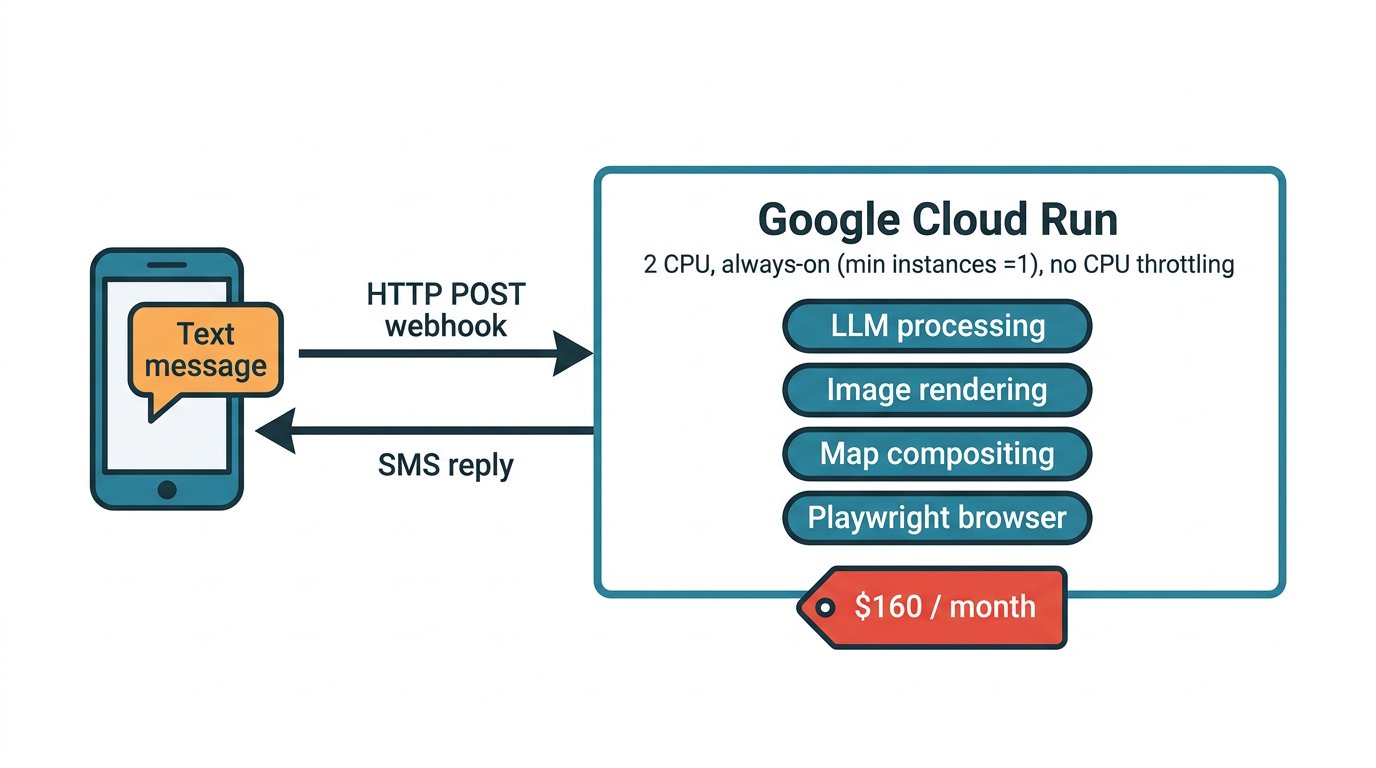
The "before" architecture. One always-on Cloud Run instance handled everything from Twilio webhook parsing to LLM orchestration to map compositing.
Why "just scale to zero" doesn't work here
The obvious first suggestion — turn off ‑‑min‑instances=1 and ‑‑no‑cpu‑throttling, let Cloud Run cold-start when needed — doesn't survive contact with the workload:
- Cold starts add 3-8 seconds just to bring a container up. That's on top of the actual work.
- CPU throttling during LLM waits. Our containers spend 15-20 seconds per request in "waiting on Vertex AI" states. With CPU throttling on, this wait allows the CPU to throttle down so that CPU-heavy code that runs after (Sharp, Canvas, Playwright) runs at 5-10% of normal speed.
We measured this. A CPU-throttled image generation on a min=0 instance took 349 seconds end-to-end. The same prompt with our production flags took 25 seconds. The 14× slowdown wasn't a cold start — it was Sharp trying to compress a 1.7 MB PNG on a throttled CPU.
A workload where CPU is idle for 90% of the request time — but needs full-speed CPU for the last 10% — fits neither Cloud Run's "billed per-request" model nor its default throttling behavior.
The design: a thin gateway plus a real machine
The right shape became obvious once we mapped out what actually needs a warm always-on CPU:
- The gateway (Twilio webhook handling, request parsing, signature validation, user lookup) is cheap and bursty. Perfect for serverless.
- The processor (LLM orchestration, tool execution, image rendering, browser automation) is compute-heavy and benefits from a dedicated CPU that's always available.
So we split them:
- Cloud Run gateway stays on Google Cloud but scales to zero. Its only job is to accept the Twilio webhook, validate it, and publish the payload to Pub/Sub. Sub-second work per request.
- VPS worker is a small always-on Linux box with 2 dedicated CPUs. It subscribes to the Pub/Sub topic, pulls messages, runs the actual LLM orchestration and image rendering, then calls back through the gateway to send the SMS reply via Twilio.
The two halves are connected by Google Cloud Pub/Sub as the message bus.
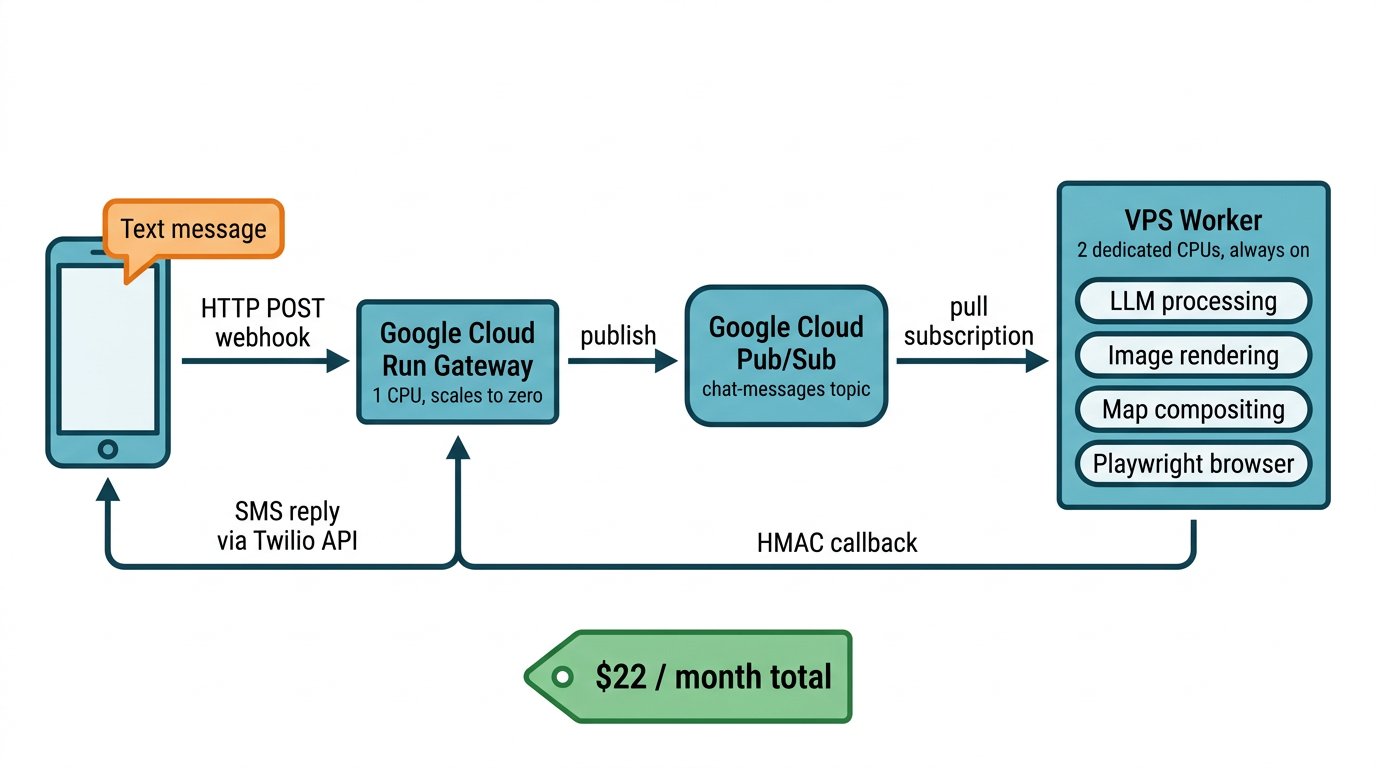
The "after" architecture. The Cloud Run gateway is now a thin publisher; the compute-heavy work runs on a dedicated VPS that reaches Cloud SQL through the Cloud SQL Auth Proxy.
Why Pub/Sub
We considered direct HTTP between the gateway and worker (with the worker exposing an endpoint over a firewall hole), a message queue on the VPS (RabbitMQ or similar), and Pub/Sub. Pub/Sub won on three properties we ended up leaning on hard:
-
The gateway doesn't need to know where the worker lives. It publishes to a topic. If we ever add a second worker, or move the worker to a different provider, the gateway doesn't change. This turned out to matter — we now have a fallback plan to move the worker into GCP Compute Engine if latency becomes an issue (more on that below), and no gateway code changes at all.
-
At-least-once delivery gives us a natural retry story. If the worker crashes mid-request, the Pub/Sub message stays in the subscription until it's acked. When the worker restarts, it picks up where it left off. We had to add a message-ID-keyed idempotency guard in the processor to make redelivery safe (a dead-letter queue catches poison messages after 5 attempts), but that's a small file, not a distributed-systems project.
-
The generous free tier absorbs our whole message budget. Cloud Pub/Sub bills starting at 10 GB/month of throughput; SMS payloads are a few kilobytes each. At our scale, Pub/Sub costs us zero dollars per month.
The one thing Pub/Sub doesn't give us for free is a synthetic liveness signal. When the worker is running fine but there's no real user traffic, we can't tell from Pub/Sub metrics whether it's alive or silently dead. We solved this with a "canary" pattern — a Cloud Scheduler job publishes a no-op message to the topic every three minutes, the worker's existing "unknown user" fast-drop path acks and discards it, and an alert fires if messages ever stop getting acked. When our worker did go zombie once during testing (an auth error killed the subscription without crashing the process), the canary caught it within an hour.
The cost math
Here's what we were paying before, and what we pay now.
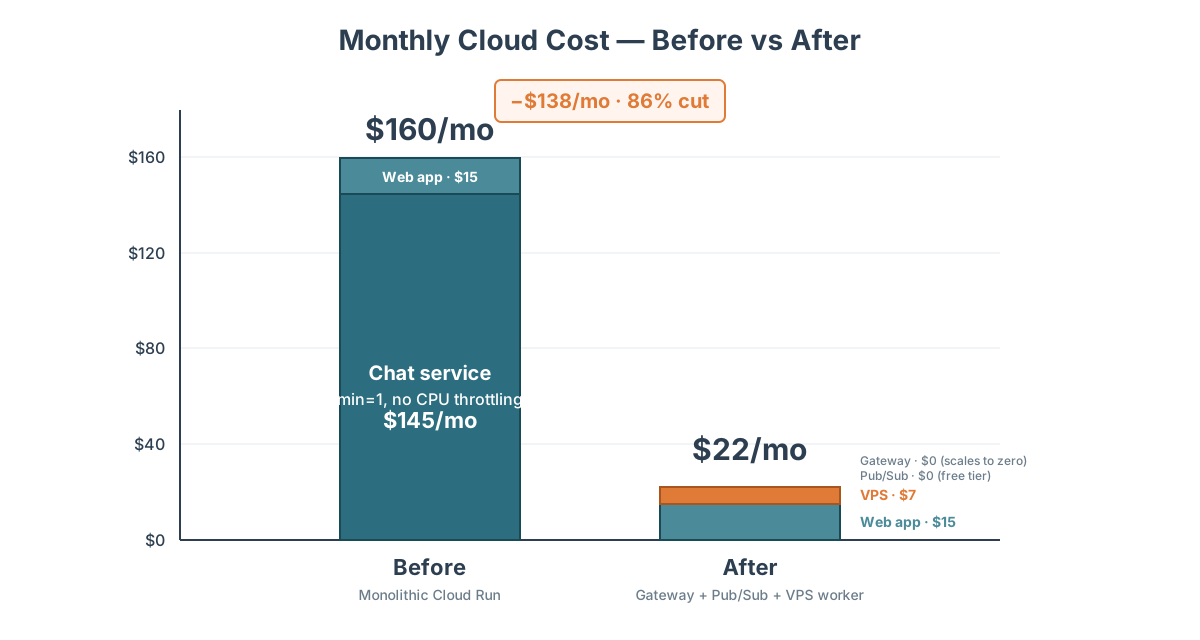
| Line item | Before | After |
|---|---|---|
| Cloud Run: chat service (2 CPU, min=1, no CPU throttling) | ~$145/mo | — |
| Cloud Run: chat gateway (1 CPU, scales to zero) | — | ~$0/mo (free tier) |
| Cloud Run: web app (unchanged) | ~$15/mo | ~$15/mo |
| Cloud Pub/Sub | — | $0/mo (free tier) |
| VPS (small 2 GB / 2 CPU box) | — | ~$7/mo |
| Total | ~$160/mo | ~$22/mo |
The VPS number assumes the yearly-commit rate (~$6.88/mo). During the testing period we've been paying month-to-month at ~$9.99/mo for flexibility to change providers or spec if needed — steady-state cost drops to the yearly-commit rate once we're confident this is the right shape.
The chat service dropped from ~$145/month to essentially free because the gateway scales to zero — Twilio webhooks are bursty and short-lived, well within Cloud Run's free tier when there's no always-on instance to bill. The VPS is a fixed monthly bill regardless of traffic, so the savings hold whether we're processing 100 messages a day or 10,000.
We also dropped the Cloud Run gateway's provisioned CPU from 2 vCPUs to 1 vCPU. All the compute-heavy work moved to the VPS, so the gateway just needs enough CPU to parse an HTTP request and publish a Pub/Sub message. That reinforces the "gateway is cheap and stateless" property that makes scale-to-zero work in the first place.
The upfront engineering cost was about a week of work — most of it careful, because we didn't want to lose any messages during the cutover. We ran both paths side by side in dev for two weeks before flipping production. The rollback plan was one line of Twilio configuration.
The latency math
We benchmarked three configurations across three representative prompts:
- Inline (cost-optimized): Cloud Run with
min=0and default CPU throttling. The "just make it cheap" version. - Inline (production-like): Cloud Run with
min=1and‑‑no‑cpu‑throttling. What we were paying $160/month for. - Split: the new architecture, Cloud Run gateway plus VPS worker.
The three prompts covered different workload shapes:
Image generation ("Generate an image of an elephant"): CPU-heavy work. The LLM calls one tool, which streams a large image from Vertex AI, compresses it with Sharp, uploads to GCS, and sends an MMS. Almost all the wall-clock time is either network I/O to Vertex or native-code compression.
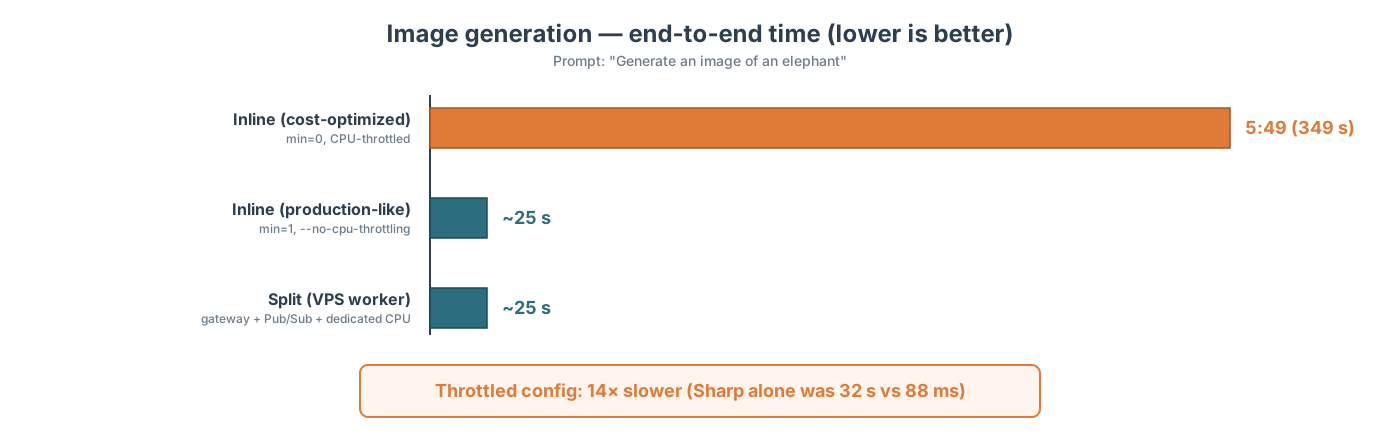
The split matches the expensive production-like configuration exactly — two dedicated VPS CPUs handle Sharp compression and Node Canvas rendering in the same ~90 ms range as an unthrottled Cloud Run instance.
Google Search ("What was the score for the World Cup final?"): a single lightweight tool call. Most of the time is spent waiting on the LLM to synthesize the answer. Essentially tied at ~11 seconds either way (11.08 s inline vs 11.36 s split — a 300 ms delta well within call-to-call noise).
Trail map ("Show me a trail map for Ardenvoir, WA"): orchestration-heavy. The LLM makes three sequential tool calls, each involving a network hop to a Google API (Maps for geocoding, Overpass for trails, Mapbox for the render).
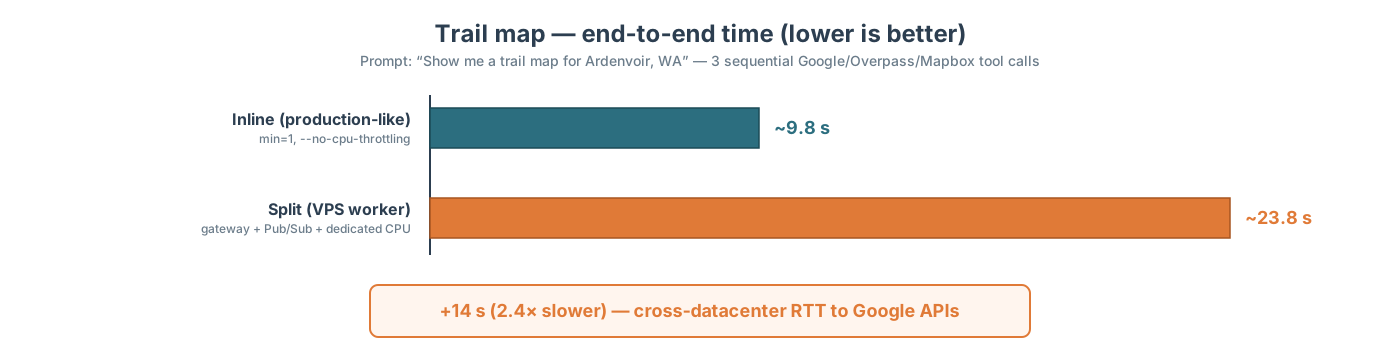
Here the split is 14 seconds slower because the VPS isn't colocated with Google's datacenters. Every call to Vertex AI, Google Maps, Overpass, and GCS pays an extra 50-200 ms of round-trip time. This particular prompt makes six sequential Google/network calls, so the overhead compounds.
That was the trade we had to swallow. Compute-heavy work matches or beats the expensive config; single-tool work is neutral; multi-tool orchestration is meaningfully slower. For our traffic mix, that's an acceptable trade — trail maps take 24 seconds instead of 10, but both are within reasonable SMS response times, and the money we save funds product work that matters more.
If multi-tool orchestration becomes the dominant workload, the fix is well-scoped: move the worker onto a Google Compute Engine VM in the same region as the APIs it calls. That would eliminate the round-trip penalty at a small (~$35/month) additional cost. The gateway wouldn't change; only the worker's hosting.
What we'd tell a team considering this pattern
If you're paying for cloud compute you're not fully using, the question worth asking is: what fraction of your always-on cost is buying you CPU headroom for occasional heavy work? If the answer is "most of it," splitting into a thin gateway plus a dedicated worker is a serious option. A few things we learned along the way:
- The messaging layer is more important than the worker's hosting. Pub/Sub gave us the freedom to change worker infrastructure later without touching the gateway. If we'd wired the gateway to call the worker's HTTP endpoint directly, that flexibility would be gone.
- Design idempotency into the processor from day one. At-least-once delivery means every side effect (SMS sends, database writes, credit deductions) needs to be safe to run twice. Skipping this looks fine in dev and blows up in production.
- Monitor the dead-air case. A worker that's silently dead but not throwing errors is invisible to normal metrics. A synthetic canary — cheap traffic that flows regardless of user activity — catches this class of failure quickly.
- Every cross-datacenter hop costs you 50-200 ms. If your heavy work reaches out to APIs colocated in a specific cloud, running the worker outside that cloud compounds fast — six sequential tool calls turned a 10-second response into a 24-second one. Know your traffic mix before deciding where the worker lives.
For us, the split cut our monthly bill from ~$160 to ~$22, made the latency numbers slightly weirder on some prompts and better on others, and left us with a system that's actually easier to reason about than the monolithic version was. It's the rare architecture change that saved money AND clarified the design, and we'd do it again.