Notes & Reminders
Your Memory.
On Your Schedule.
Save anything via SMS. Set reminders that don't just ping you — they run any instruction intelligently execute any instruction and deliver the result to your phone. No app, no internet required.
A Persistent Memory for the Trail
Notes give RidgeText a long-term memory — turning it from a lookup tool into a planning companion that remembers what you tell it.
Save Anything
Text "Note:" followed by anything — gear lists, campsite coordinates, supply stops, or a thought that occurred to you mid-trail.
Recall Instantly
Ask "List my notes" any time and get every saved note back, numbered and in order. No app, no login — just a text.
Delete When Done
Mark a note complete or delete it by number. Keep your list clean without digging through apps or notebooks.
Dashboard Access
View, add, and delete notes from your RidgeText dashboard when you're back at camp or at home — same notes, two ways to manage them.
Notes in Action
Save a note, list them all, delete what you're done with — right from your SMS thread.
You
Take a note, bring milk to the campground.RidgeText
OK. I've saved that note for you: bring milk to the campground.You
Make a note to put out the fire before we leave.RidgeText
OK. I've saved that note: put out the fire before we leave.You
Please list my notes.RidgeText
Here are your current notes: 1. Bring milk to the campground. 2. Put out the fire before we leave.You
The note about milk is done.RidgeText
OK. I've removed that note. Your only remaining note is: 1. Put out the fire before we leave.Reminders That Actually Do Things
Most reminders just buzz at you. RidgeText reminders execute your instruction at the scheduled time. The instruction can be anything that RidgeText can normally do: a simple nudge, a generated weather infographic, a daily news briefing. RidgeText sends you the result at your scheduled time.
One-Shot Reminders
"Remind me to call the ranger station tomorrow at 8am." RidgeText fires exactly once at the right time.
Recurring Schedules
Any instruction, any cadence. Daily, weekly, or on a custom interval — "Every morning at 8am" or "every Sunday at 6pm" — RidgeText keeps firing until you cancel.
Intelligent Reminders
The instruction can be anything RidgeText can do — a weather forecast image, a daily news briefing, trail conditions, a simple nudge. RidgeText runs it in full and sends you the result.
Cancel Anytime
"List my reminders" shows everything scheduled. Cancel by number or description — recurring or one-time, gone instantly.
Reminders in Action
Set any instruction on a schedule. When the time comes, RidgeText executes it and sends you the result.
You
Every morning at 8am generate a 3-day weather forecast infographic for Seattle, WA, including the day name and date for each day.RidgeText
Done! You'll get a Seattle 3-day forecast image every morning at 8:00 AM.You
Every day at 5pm send me the latest news — world news first, then US, then Pacific Northwest.RidgeText
Set! Daily news briefing at 5:00 PM starting today.RidgeText
Seattle is heading into a period of very warm weather, with a Heat Advisory in effect starting Sunday. Here is your 3-day outlook: - June 12: Sunny, High 74 / Low 56 - June 13: Sunny, High 80 / Low 60 - June 14: Sunny, High 84 / Low 62 Please stay hydrated and take precautions during this heat.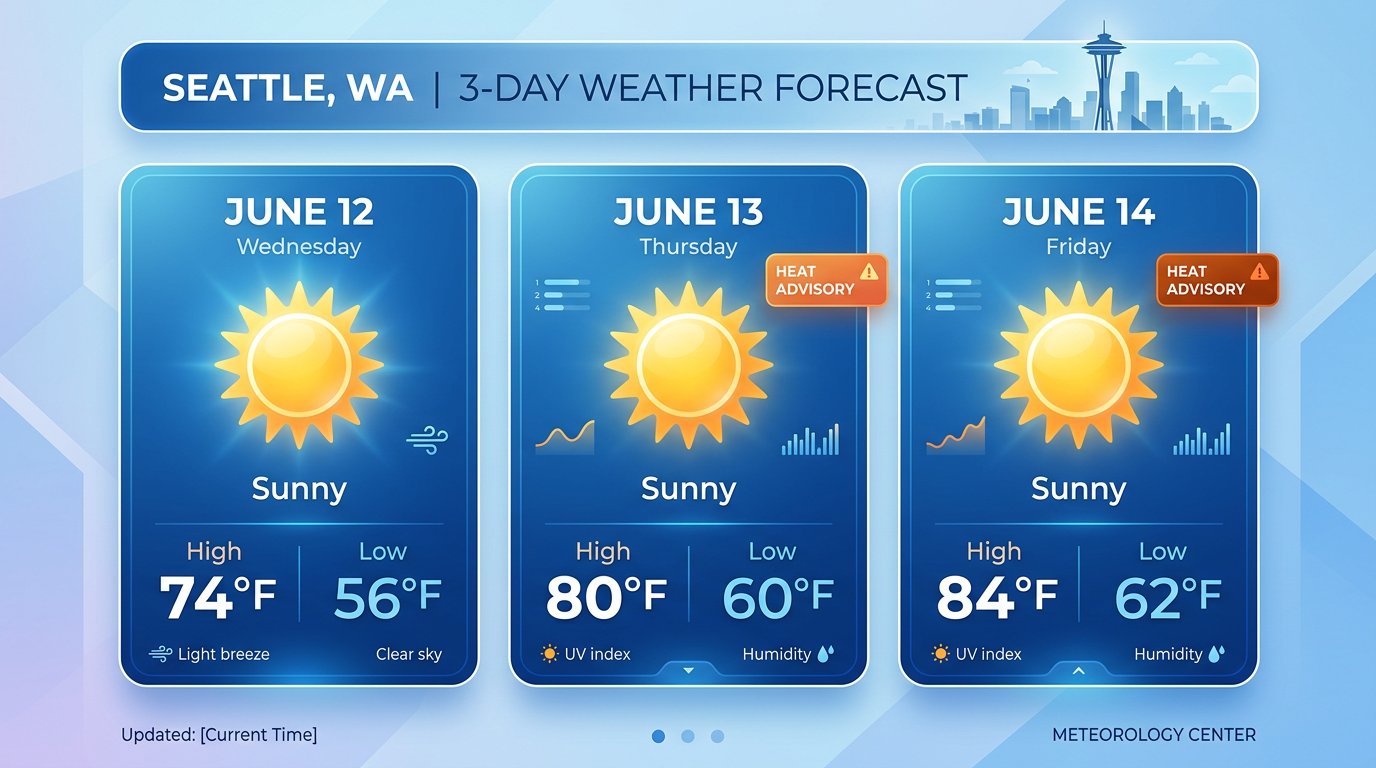
You
Cancel my daily news briefing.RidgeText
Cancelled. Your daily news briefing has been removed.For the Trail and the Everyday
From multi-day expedition planning to a daily news briefing, notes and reminders keep your head clear and your details covered.
Gear Lists
"Note: tent, sleeping bag, bear canister, headlamp x2, water filter"
Waypoints
"Note: trailhead parking at 47.8821, -121.7244 — gate closes at 8pm"
Weather Infographic
"Every morning at 8am generate a 3-day weather forecast infographic for Seattle, WA, with day names and dates."
Daily News
"Every day at 5pm send me the latest news — world first, then US, then Pacific Northwest."
Camp Tasks
"Remind me in 3 hours to check if the food bag is hung properly"
Resupply
"Note: pick up fuel canisters and freeze-dried meals in Bend before Friday"
Permit Windows
"Remind me March 1st at 7am to check recreation.gov for permits"
Also Available on the Dashboard
Manage your notes and view upcoming reminders from the RidgeText dashboard. Add or delete notes by typing, see what reminders are scheduled — everything stays in sync with your SMS thread.
Remember Everything. Miss Nothing.
Start texting notes and reminders to RidgeText today. No app, no setup — just text.